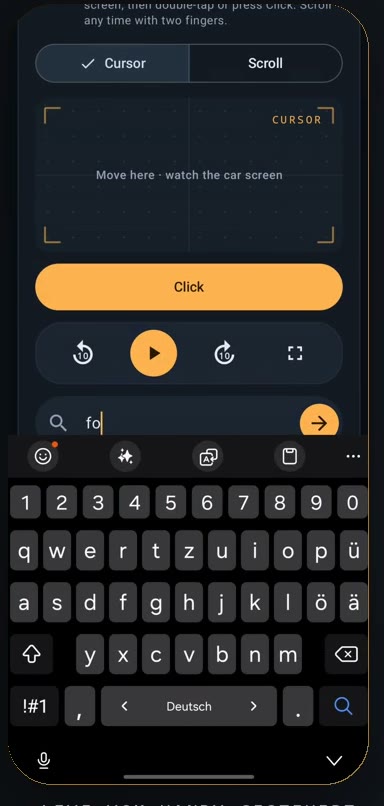
01 CAR BROWSER
The web, right on your dashboard.
Search, stream, and open any site in the built-in browser — rendered on the car screen, driven from your phone.
PHONE HEAD UNIT
Browse the web, control media, or mirror your phone — directly on the car display you already own.
For use while parked or by passengers only.
Trial5 min freefull feature set
License€9.99 onceno subscription
InstallDirect APKno Play Store
UpdatesIn-appone tap away
ONE SYSTEM · THREE MODES
Media2Car unlocks more from the Android Auto display you already own. No extra hardware. No detours.
01 CAR BROWSER
Search, stream, and open any site in the built-in browser — rendered on the car screen, driven from your phone.
02 SCREEN MIRROR
Mirror any app to the car display while every interaction stays on the device you know best.
03 REMOTE CONTROL
Move the cursor, scroll, tap, and steer media with precise, familiar gestures — the phone becomes your trackpad.
BOOT SEQUENCE
No Play Store and no extra hardware. Install the APK directly on your Android phone.
EST. SETUP TIME · 3 MIN
Download the file on your Android phone and confirm that you want to keep it if prompted.
Temporarily allow apps from this source for your browser, then install Media2Car.
Open Media2Car, choose “Activate for Android Auto,” and confirm the system prompt.
Connect your phone to the car and launch Media2Car from the Android Auto app menu.
Enable the Android Auto developer options once:
ONE PAYMENT · NO SUBSCRIPTION
Use the complete app free for 5 minutes. Decide only after you know it works in your car.
LIFETIME LICENSE
Try it first — no payment details required.
An Android phone running Android 10 or later, plus a vehicle or head unit with Android Auto.
Browser and screen-mirroring features are not supported for projected Android Auto through the Play Store. Media2Car is therefore distributed directly as an APK.
No. Browsing, video, and screen mirroring are intended only for use while parked or by passengers. Always follow local laws and regulations.
Your license is linked to one active device. You can restore it on a new phone using your email; a short transfer cooldown may apply.
Yes. Media2Car checks for new releases inside the app and directs you to the latest APK download.
READY WHEN YOU ARE
ANDROID 10+ · DIRECT INSTALL